
MCP server for planning
Plan your work with Claude Code and Codex
ALT is a native Mac planner with a local MCP server inside. Connect Claude Code or Codex, and they read and change your tasks, projects and notes. You see every change in ALT and can undo it. ALT is in private beta.
What Claude Code and Codex can do
Read your plan
- A day: planned tasks with their time slots, tasks due or overdue, busy time.
- A week, month or year: tasks by day, week and month, and the projects running in it.
- Tasks, projects, areas and sections, with estimates and deadlines.
- Your notes, in full.
Create and change, right away
- Create a task, or change its title, project, section, day, deadline, estimate or notes, or complete it.
- Create a project in an area or inside another project, with its result, months and sections. Rename it, finish it or bring it back.
- Create and rename areas, add sections.
- Create a note in a project or an area, and rewrite a note.
Plan and delete, after your Apply
Several changes at once, time slots on a day, a week, a month or a project's months, and every deletion come to ALT as a proposal. It shows what the changes do to your hours, and nothing changes until you press Apply. Claude Code or Codex can then check what was applied, what wasn't, and why.
How it works, and why it's safe
- Local. The server runs inside ALT and answers only apps on this Mac. It works while ALT is open, even with its window closed. If ALT isn't running, Claude Code or Codex is told to ask you to open it.
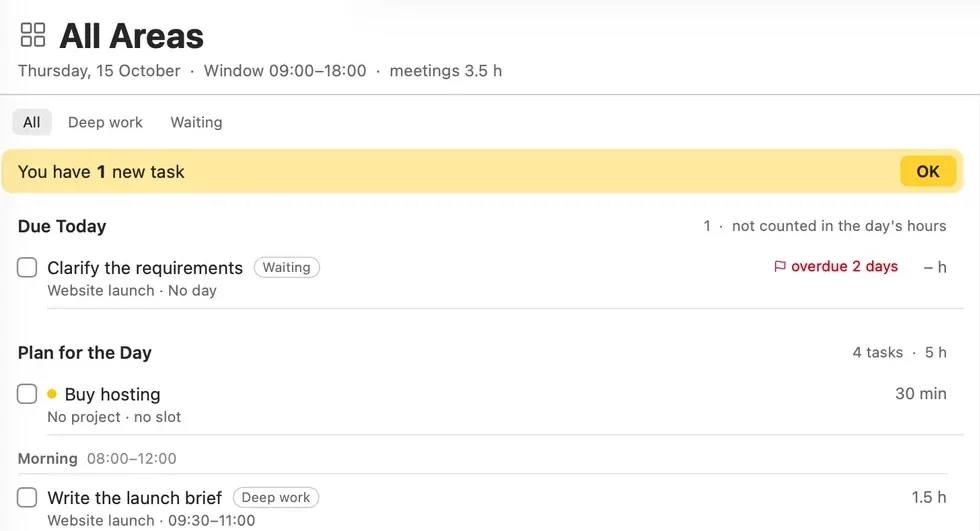
- Marked as new. Tasks that Claude Code or Codex adds or moves get a dot, and the list says "You have 1 new task" until you press OK.
- Undo. Each change shows in ALT with who made it. Change History keeps the last 7 days, and any batch can be undone.
- Nothing twice. Every change carries a request ID. If Claude Code or Codex retries after a failure with the same ID, ALT doesn't apply it again.
- Your limits. For each assistant you choose read only or read and change, and whether it sees all areas, one area or one project.
How to connect
1Turn it on in ALT.
Open Settings, then AI. Turn on Claude Code or Codex, and choose what it may do and see.
2Run one command.
Press Connect over MCP..., pick Claude Code or Codex and copy the command. Run it once in Terminal: it connects ALT for every folder on your Mac.
3Ask about your plan.
In Claude Code or Codex, ask what's on today or to add a task. The change shows up in ALT.
Questions
Does my plan leave my Mac?
The connection is local: ALT answers only apps on this Mac, without our server. But Claude Code and Codex send what they read to Anthropic and OpenAI servers. To pass on less, let an assistant see one area or one project.
Can Claude Code or Codex delete my tasks?
Only with your Apply. Deleting a task, a project or an area is a proposal that waits in ALT until you confirm it.
What if I don't like a change?
Undo it. Every change from Claude Code or Codex is in Change History for 7 days.
How do I disconnect?
Turn the assistant off in Settings, then AI: ALT rejects its requests and tells it why. A new token also stops the old connection.
See how ALT compares with Sunsama, Motion, Akiflow, Things 3 and Todoist: all comparisons. Or read more about ALT.